Short answers to the questions owners ask most about online voting.
I was sent a StrataVote link, or my manager mentioned StrataVote. Is that VoteMax?
No. StrataVote is a different online voting product that some managers use instead of StrataMax VoteMax. If your building uses StrataVote, you will not see a VoteMax tab in the StrataMax Portal. Use the voting link your manager sent, and contact your manager if it does not work.
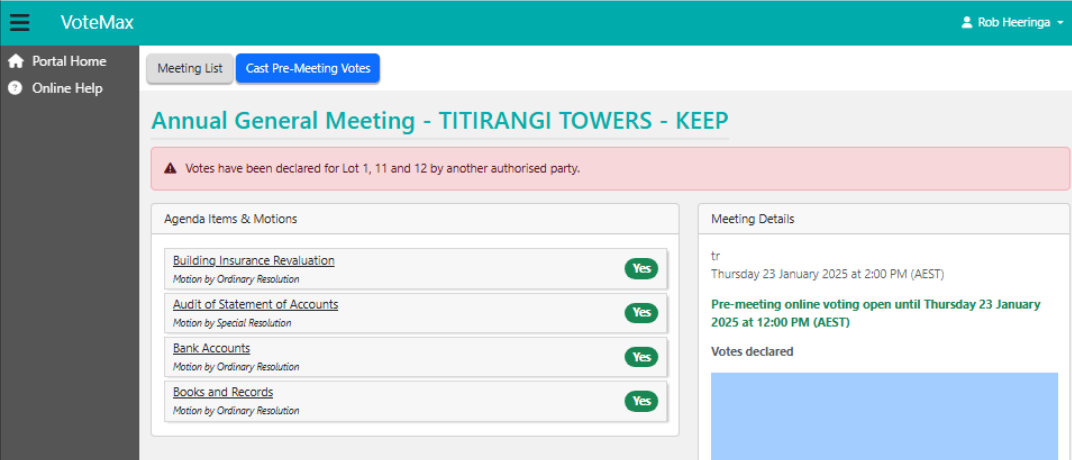
It says votes have already been declared for my lot by another authorised party.
This happens when another owner or representative of your lot has already voted, or when more than one party is authorised to vote for the lot. You can still vote on the motions, but you will be asked to confirm that you want to proceed and override the existing votes. If you believe this is wrong, contact your strata manager.
I thought I voted, but I am not sure it was submitted.
Selecting a meeting does not record a vote. You must click Cast Votes, vote on each motion, then tick the declaration and click Declare Votes. When your votes are declared, all owners of the lot get a confirmation email. See VoteMax Troubleshooting.

Can I change my vote after I have declared?
Yes, any time before the voting window closes. Open the meeting, click Cast Votes, select the motion, click Change, update your vote, then declare again.

Can I lodge or submit a motion in VoteMax?
No. VoteMax is for voting on motions your manager has already set up. To submit a motion for a meeting, contact your strata manager or committee about your scheme's process.
I own more than one lot. Do I vote for each one?
If all your lots are linked to your Portal account, you vote once and your vote applies to all of them. They are listed under Representing on the voting screen.
Who receives the confirmation of my vote?
All owners recorded on the lot receive an email confirming the votes submitted.
Who do I contact?
Contact StrataMax Support for Portal login issues (via the Contact Us link at the top right of this page) and account problems. Contact your strata manager for the meeting setup, whether voting is open, your access, and StrataVote or other voting links. See Who Do I Contact?.